
Ask Your Question

Revision history [back]

click to hide/show revision 1
initial version

bi-directional slowness

hi,

I am seeing slow file transfers in one direction only to a Windows 2016 server. Both file copy (SMB) and iPerf tests show very similar results. Windows 2022 VM -> Windows 2016 VM (only 2.5Gbps), if I flip the direction and go from Windows 2016 VM -> Windows 202 VM (transfer speed is up to 6.5Gbps). Both VMs have VMXN3 nics with the latest vmware tools and nic drivers (1.9.14.0)

When looking at a trace file from a SLOW (2.5Gbps) transfer, there are intervals of 100s of DUP ACKs (all of them have SACKs), I am not sure if I should be seeing them on a low latency network. [RTT to ACK the segment was: 0.000196000] [iRTT 0.000395000]. Any why only in one direction?

Wireshark capture is split in multiple parts, here is the graph of the first 2 second part. Looking for suggestions / recommendations on what to check next?
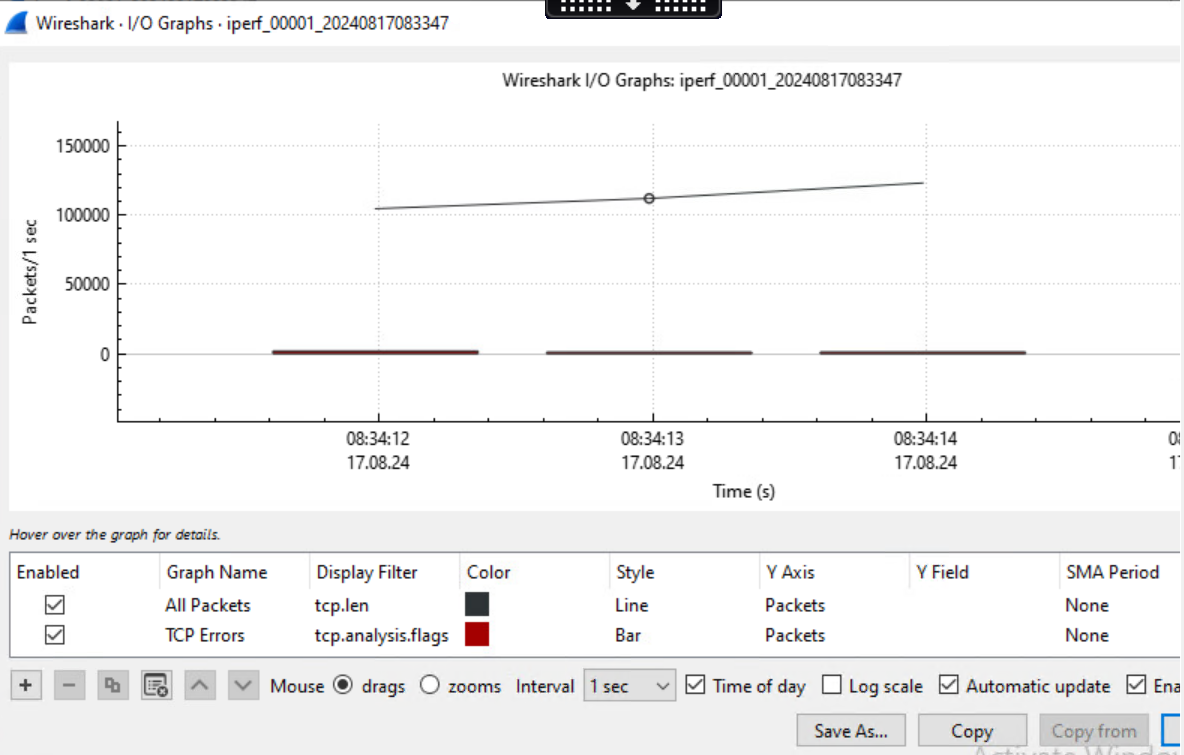
image description

Thank you very much.

bi-directional slowness

hi,

I am seeing slow file transfers in one direction only to a Windows 2016 server. Both file copy (SMB) and iPerf tests show very similar results. Windows 2022 VM -> Windows 2016 VM (only 2.5Gbps), if I flip the direction and go from Windows 2016 VM -> Windows 202 VM (transfer speed is up to 6.5Gbps). Both VMs have VMXN3 nics with the latest vmware tools and nic drivers (1.9.14.0)

When looking at a trace file from a SLOW (2.5Gbps) transfer, there are intervals of 100s of DUP ACKs (all of them have SACKs), I am not sure if I should be seeing them on a low latency network. [RTT to ACK the segment was: 0.000196000] [iRTT 0.000395000]. Any why only in one direction?

Wireshark capture is split in multiple parts, here is the graph of the first 2 second part. Looking for suggestions / recommendations on what to check next?

image description

Thank you very much.

bi-directional slowness

hi,

I am seeing slow file transfers in one direction only to a Windows 2016 server. Both file copy (SMB) and iPerf tests show very similar results. Windows 2022 VM -> Windows 2016 VM (only 2.5Gbps), if I flip the direction and go from Windows 2016 VM -> Windows 202 VM (transfer speed is up to 6.5Gbps). Both VMs have VMXN3 nics with the latest vmware tools and nic drivers (1.9.14.0)

When looking at a trace file from a SLOW (2.5Gbps) transfer, there are intervals of 100s of DUP ACKs (all of them have SACKs), I am not sure if I should be seeing them on a low latency network. [RTT to ACK the segment was: 0.000196000] [iRTT 0.000395000]. Any why only in one direction?

Wireshark capture is split in multiple parts, here is the graph of the first 2 second part. Looking for suggestions / recommendations on what to check next?

image description

Thank you very much.

bi-directional slowness

hi,

I am seeing slow file transfers in one direction only to a Windows 2016 server. Both file copy (SMB) and iPerf tests show very similar results. Windows 2022 VM -> Windows 2016 VM (only 2.5Gbps), if I flip the direction and go from Windows 2016 VM -> Windows 202 VM (transfer speed is up to 6.5Gbps). Both VMs have VMXN3 nics with the latest vmware tools and nic drivers (1.9.14.0)

When looking at a trace file from a SLOW (2.5Gbps) transfer, there are intervals of 100s of DUP ACKs (all of them have SACKs), I am not sure if I should be seeing them on a low latency network. [RTT to ACK the segment was: 0.000196000] [iRTT 0.000395000]. Any why only in one direction?

Wireshark capture is split in multiple parts, here is the graph of the first 2 second part. Looking for suggestions / recommendations on what to check next?

image description

Thank you very much.

bi-directional slowness

hi,

I am seeing slow file transfers in one direction only to a Windows 2016 server. Both file copy (SMB) and iPerf tests show very similar results. Windows 2022 VM -> Windows 2016 VM (only 2.5Gbps), if I flip the direction and go from Windows 2016 VM -> Windows 202 VM (transfer speed is up to 6.5Gbps). Both VMs have VMXN3 nics with the latest vmware tools and nic drivers (1.9.14.0)

When looking at a trace file from a SLOW (2.5Gbps) transfer, there are intervals of 100s of DUP ACKs (all of them have SACKs), I am not sure if I should be seeing them on a low latency network. [RTT to ACK the segment was: 0.000196000] [iRTT 0.000395000]. Any why only in one direction?

Wireshark capture is split in multiple parts, here is the graph of the first 2 second part. Looking for suggestions / recommendations on what to check next?

image description

Thank you very much.

bi-directional slowness

hi,

I am seeing slow file transfers in one direction only to a Windows 2016 server. Both file copy (SMB) and iPerf tests show very similar results. Windows 2022 VM -> Windows 2016 VM (only 2.5Gbps), if I flip the direction and go from Windows 2016 VM -> Windows 202 VM (transfer speed is up to 6.5Gbps). Both VMs have VMXN3 nics with the latest vmware tools and nic drivers (1.9.14.0)

When looking at a trace file from a SLOW (2.5Gbps) transfer, there are intervals of 100s of DUP ACKs (all of them have SACKs), I am not sure if I should be seeing them on a low latency network. [RTT to ACK the segment was: 0.000196000] [iRTT 0.000395000]. Any why only in one direction?

Wireshark capture is split in multiple parts, here is the graph of the first 2 second part. Looking for suggestions / recommendations on what to check next?

image description

Thank you very much.

bi-directional slowness

hi,

I am seeing slow file transfers in one direction only to a Windows 2016 server. Both file copy (SMB) and iPerf tests show very similar results. Windows 2022 VM -> Windows 2016 VM (only 2.5Gbps), if I flip the direction and go from Windows 2016 VM -> Windows 202 VM (transfer speed is up to 6.5Gbps). Both VMs have VMXN3 nics with the latest vmware tools and nic drivers (1.9.14.0)

When looking at a trace file from a SLOW (2.5Gbps) transfer, there are intervals of 100s of DUP ACKs (all of them have SACKs), I am not sure if I should be seeing them on a low latency network. [RTT to ACK the segment was: 0.000196000] [iRTT 0.000395000]. Any why only in one direction?

Wireshark capture is split in multiple parts, here is the graph of the first 2 second part. Looking for suggestions / recommendations on what to check next?

image description

Thank you very much.

bi-directional slowness

hi,

I am seeing slow file transfers in one direction only to a Windows 2016 server. Both file copy (SMB) and iPerf tests show very similar results. Windows 2022 VM -> Windows 2016 VM (only 2.5Gbps), if I flip the direction and go from Windows 2016 VM -> Windows 202 VM (transfer speed is up to 6.5Gbps). Both VMs have VMXN3 nics with the latest vmware tools and nic drivers (1.9.14.0)

When looking at a trace file from a SLOW (2.5Gbps) transfer, there are intervals of 100s of DUP ACKs (all of them have SACKs), I am not sure if I should be seeing them on a low latency network. [RTT to ACK the segment was: 0.000196000] [iRTT 0.000395000]. Any why only in one direction?

Wireshark capture is split in multiple parts, here is the graph of the first 2 second part. Looking for suggestions / recommendations on what to check next?

image description

Thank you very much.