alt text

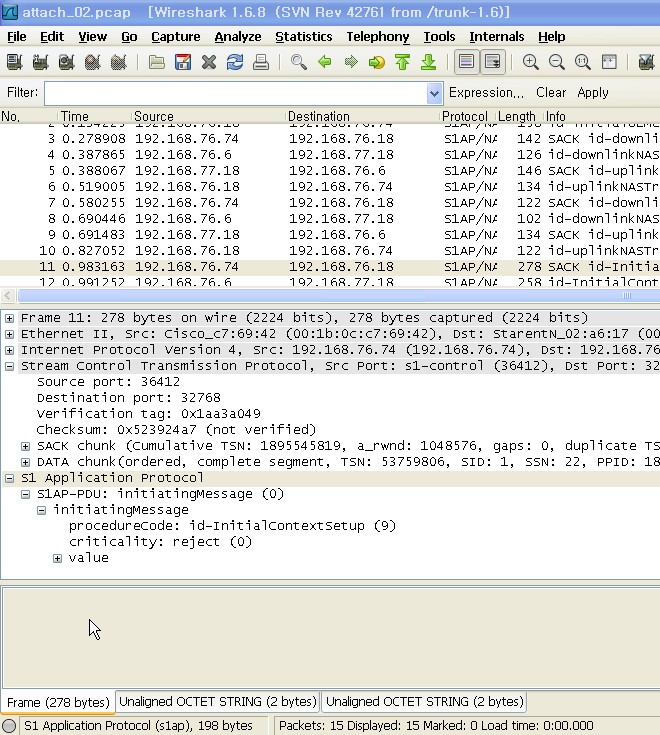
Hi all in my wireshark, packet bytes field is not shown such as attached image. some frames are good but few frames doesn't show packet bytes filed. (packet list and packet details field are shown always)

how can i fix it?

asked 12 Jun '12, 19:23

Ray_Han's gravatar image

Ray_Han
1334
accept rate: 0%

edited 12 Jun '12, 19:23

after downgrading into ver1.4.13, this phenomenon is not shown. it seems like a bug or something else.

Thanks.

(12 Jun '12, 20:39) Ray_Han

I had the same problem, and managed to solve it:

  1. Go to Edit -> Preferences
  2. There, go to User Interface / Layout
  3. Make sure Packet Bytes is selected for Pane 3 (or Pane 1 or Pane 2, as you wish).
  4. If needed, open the View menu and toggle Packet Bytes
link

answered 06 May, 02:41

Roel%20Schroeven's gravatar image

Roel Schroeven
111
accept rate: 0%

Your answer
toggle preview

Follow this question

By Email:

Once you sign in you will be able to subscribe for any updates here

By RSS:

Answers

Answers and Comments

Markdown Basics

  • *italic* or _italic_
  • **bold** or __bold__
  • link:[text](http://url.com/ "Title")
  • image?![alt text](/path/img.jpg "Title")
  • numbered list: 1. Foo 2. Bar
  • to add a line break simply add two spaces to where you would like the new line to be.
  • basic HTML tags are also supported

Tags:

×94
×12

Asked: 12 Jun '12, 19:23

Seen: 938 times

Last updated: 06 May, 03:51

powered by OSQA